Nw Avuxeni Computer Academy

1. What is a Table?

Lesson: MS Word Tables & Columns

A table in MS Word is a grid made up of rows and columns.
  • Rows run horizontally
  • Columns run vertically
  • Where a row and column meet is called a cell

Tables are used to organize information neatly, like lists, schedules, or data.


2. How to Insert a Table

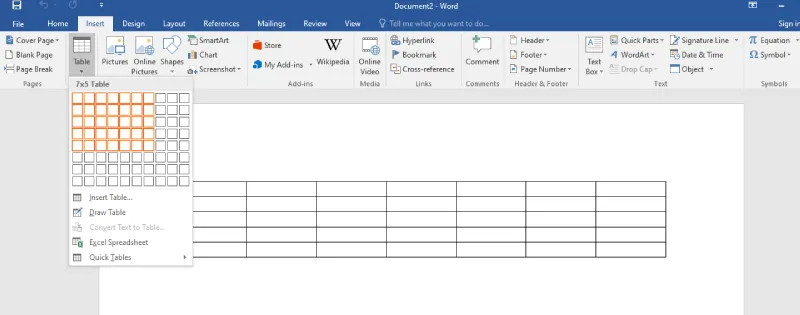
To insert a table in MS Word:

  • Go to the Insert tab
  • Click Table
  • Choose the number of rows and columns

Shortcut method:

  • Use Insert → Table

3. Working with Tables

Adding Rows

  • Press Tab in the last cell to create a new row

Selecting a Table

  • Press Ctrl + A inside the table

Moving Between Cells

  • Press Tab to move forward

4. Table Tools

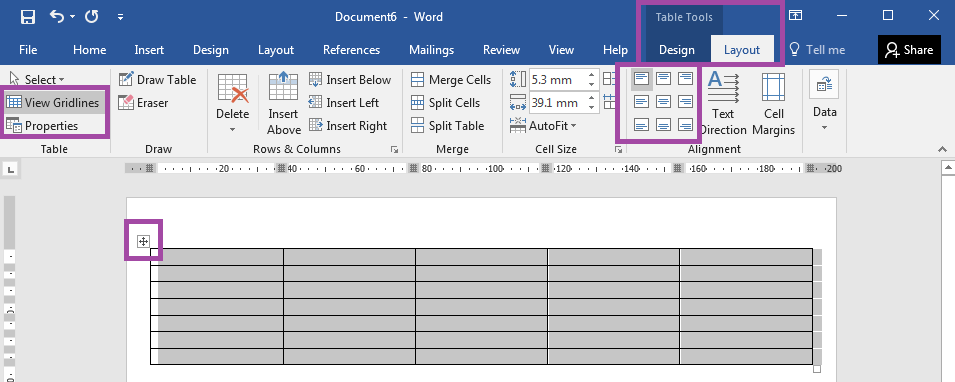
When you click inside a table, a new tab appears:

  • Table Tools

This includes:

  • Table Design (for styles, borders, shading)
  • Layout (for rows, columns, merging, etc.)

5. Formatting Tables

Merging Cells

  • Combine multiple cells into one using Merge Cells

Splitting Cells

  • Divide a cell into smaller cells using Split Cells

Adjusting Column Width

  • Drag the column borders manually

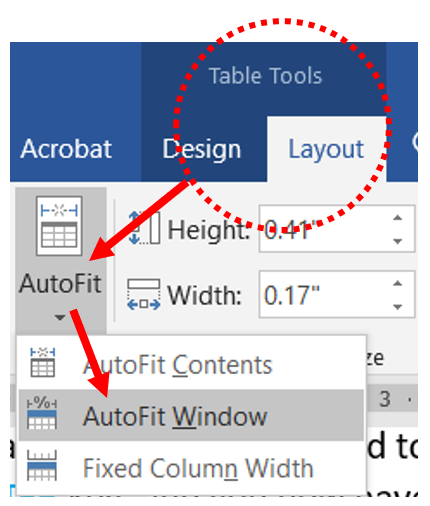
AutoFit

  • Automatically adjusts table size:
    • AutoFit to Contents
    • AutoFit to Window

6. Table Design Features

Borders

  • Add or change lines around cells

Shading

  • Change the background color of a cell

Table Styles

  • Apply pre-designed styles using Table Design

7. Managing Tables

Delete Table

  • Removes the entire table (not just borders)

Split Table

  • Break one table into two separate tables

Convert Text to Table

  • Turns text into a table format

8. Columns in MS Word (Text Columns)

Columns are used to divide text into vertical sections (like a newspaper).

Creating Columns

  • Go to the Layout tab
  • Click Columns

Default Columns

  • A Word document starts with 1 column

Column Options

  • Equal width columns
  • Custom column widths

9. Column Breaks

What is a Column Break?

  • Moves text to the next column

How to Insert

  • Go to Layout → Breaks → Column

10. Important Features to Remember

  • Distribute Columns → Makes columns equal width
  • Maximum columns in a table → 63
  • Column break → Moves text, not deletes it
  • AutoFit → Adjusts table automatically
 
Nw Avuxeni Computer Academy Online Now Accept